ITR Computation: Meaning & How to Download ITR Computation Pdf Online
When banks, NBFCs or visa officers ask for “ITR computation” or “ITR computation and acknowledgement”, most people are confused about what this document actually is. This guide explains ITR computation meaning, how to download it from the income tax portal, and how to Download ITR Computation Pdf online.
What Is ITR Computation?
ITR computation is the detailed calculation sheet that shows how your total income and income tax have been computed under different heads like salary, house property, business, capital gains and other sources. It breaks down gross income, deductions, taxable income and final tax liability in a clear, line‑by‑line format.
Difference Between ITR, ITR Acknowledgement and ITR Computation
Many taxpayers search “difference between ITR and computation of income” or “difference between ITR acknowledgement and computation” because these three documents look similar at first glance.
- ITR form: The complete return you file online with all schedules and details.
- ITR acknowledgement: A short one‑page proof that your ITR has been successfully filed.
- ITR computation: The detailed working of your total income and tax, also called computation of income or tax computation sheet.
When a bank writes “submit ITR and computation of income for last 3 years”, they are asking for the full filed ITR (or acknowledgement) plus the detailed ITR computation sheet or PDF for each year.
How to Get or Download ITR Computation from Income Tax Portal
If you search for “how to get ITR computation” or “how to download ITR and computation”, you usually want the official copy from the e‑filing portal. Here is the general process for AY 2025‑26:
- Log in to the income tax e‑filing portal with your PAN and password.
- Go to the Filed Returns section and choose the relevant assessment year.
- Open the filed ITR for that year to see available download options:
- ITR acknowledgement (PDF),
- ITR Form
- ITR JSON file
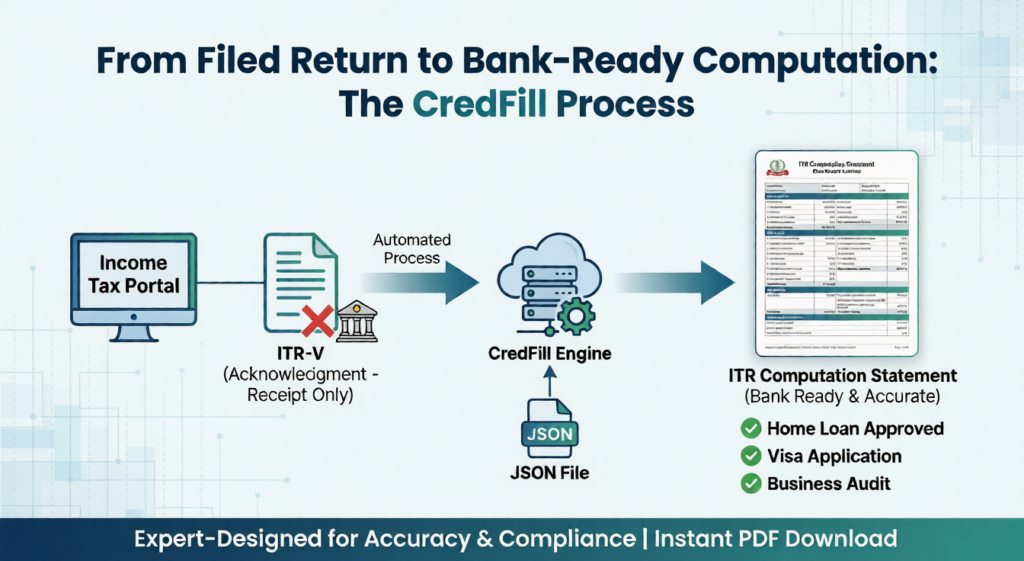
- Generally a direct ITR computation download is not available, download the ITR JSON file instead. You can then create the computation sheet from this JSON using our itr computation generator from json tool.
This process works whether you filed ITR‑1, ITR‑2, ITR‑3 or ITR‑4; the main difference is what details appear inside the computation.
Create ITR Computation Online from JSON File (Fast Method)
Often the portal only gives you the ITR JSON file, which is not readable for banks or clients. Instead of manually preparing an Excel ITR computation format, you can convert JSON to a professional computation PDF within seconds. You can use the CredFill ITR computation tool here:
Typical flow for users:
- Download your ITR JSON file (ITR‑1, ITR‑3 or ITR‑4) from the income tax portal.
- Open the CredFill ITR computation generator and select your ITR type.
- Upload the JSON file and click on Generate.
- Instantly download your ITR Computation PDF within seconds.
ITR Computation for Business Income (ITR‑3 / ITR‑4)
Business owners, freelancers and professionals often need business ITR computation for loans, tenders or government registrations. They also search “ITR 4 JSON computation & balance sheet” or “company ITR computation” when handling small entities.
In business cases, the ITR computation:
- Includes presumptive sections (for ITR‑4) or full profit & loss and balance sheet (for ITR‑3).
- Shows business turnover, expenses, net profit, and how this profit forms part of total income.
- Provides clear visibility for lenders and departments on your business income over multiple years.
Use the same CredFill computation generator, and Get a consistent, machine‑generated computation and income summary across years.